I test gadgets for a living, and this year my top pick has been a digital calendar. I have tried everything from the well‑known Skylight Calendar to a handful of lesser‑known brands that you might not have heard of unless you have spent hours searching online. These devices pull data from popular calendar services such as Google Calendar, iCal and Outlook and display it on a physical screen, letting you see your schedule without reaching for your phone. They also let you combine several calendars, so I can view my personal and work schedules, my husband’s calendar, my son’s school timetable and even a special calendar I created to track my pregnancy, all on one device.
Digital calendars do more than just show a larger view of your appointments. Many double as chore trackers for families, with one model even calculating kids’ allowance based on completed tasks. They can also serve as digital photo frames and meal planners, making them more useful than the smart displays I have used for years.
I tested five digital calendars this year and have identified a few clear favorites. Skylight remains a strong choice for overall experience, but two of its best features—the photo screensaver and the meal‑planning tool—are locked behind a subscription. If you prefer a device that does not require a recurring fee, the top option on sale right now fits the bill.
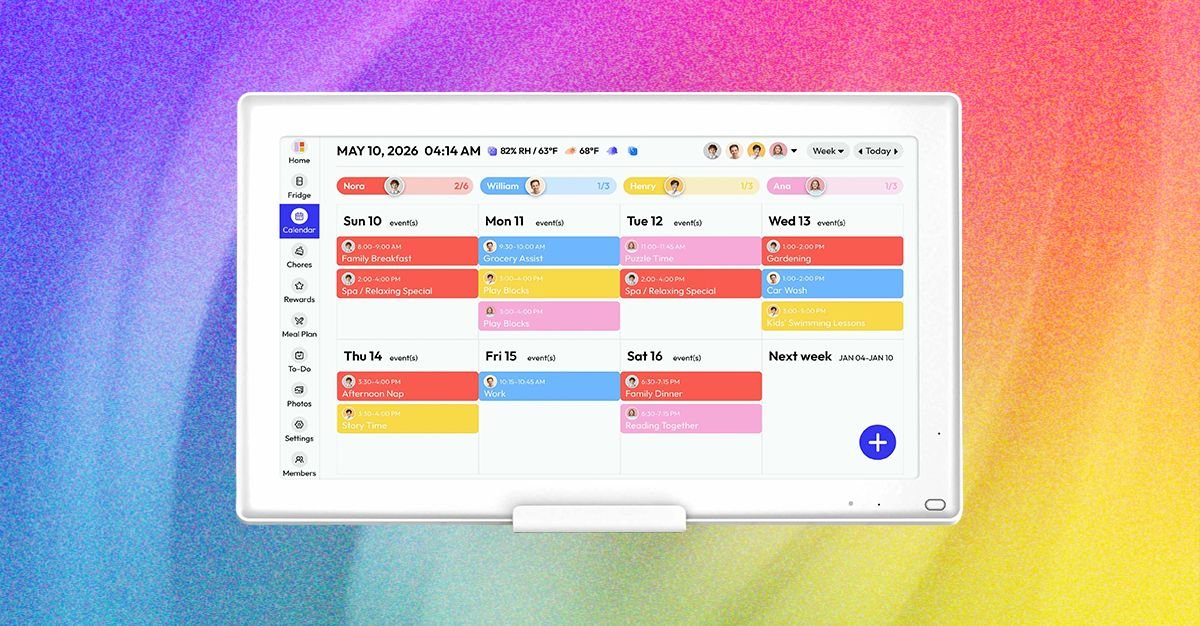
Everblog’s HomeCal 21.5‑inch Calendar is currently discounted to $350 on Amazon (down from $699) and $400 on the Everblog website (down from $500). The HomeCal delivers a user experience that feels very similar to Skylight, yet all features are available without a subscription. The device includes tabs for chores, to‑do lists, rewards for completing tasks, and meal planning. You set everything up through the companion app, creating profiles for each family member before the calendar is ready to use. The photo uploader in Everblog’s app works more slowly than Skylight’s because it only allows one image at a time, but I would rather accept that limitation than pay a monthly charge. My only wish is that the calendar had a built‑in voice assistant; however, almost no digital calendars offer that feature, and the few that do charge extra for it.
The 21.5‑inch screen is large enough to be useful but not so big that it dominates a room. The package includes wall‑mounting hardware, and the flat base lets the unit sit on a tabletop. For a sturdier tabletop arrangement, I recommend adding the optional Calendar Stand for $39, as the unit can wobble when placed on a flat surface. Wood frames are also available for $99 if you want the calendar to blend with your décor.
Neither accessory is currently discounted, but the reduced price of the HomeCal—about $300 on Amazon after the $100 discount and $50 off when purchased directly from Everblog—leaves room in the budget for these useful add‑ons. With this deal, you can enjoy a more organized holiday season without the hassle of a subscription.